The latest version of BlackSheep brings new options and fixes a few bugs. I encourage all users of BlackSheep to upgrade by downloading the latest version.
New options
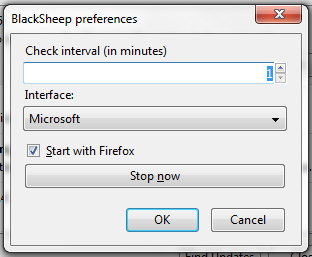 |
| Start BlackSheep automatically or manually |
BlackSheep can start automatically with Firefox (as the previous version did), or manually. This allows you to use BlackSheep only when you move to a wireless network, for example.
I've changed the options slightly, for when BlackSheep actually starts. Previously, if the "check interval" value was set to 5 minutes (default value), BlackSheep would start 5 minutes after the browser was opened, and then every 5 minutes. Now, BlackSheep runs immediately, when the browser first launches, and then every 5 minutes thereafter.
A shortcut to the BlackSheep options has been added under the Tools menu for easy access.
Bookmark and installation issues
Some users have reported that the bookmarks no longer work after installing BlackSheep. This seems to be caused by external security tools (antivirus, sandbox). Disabling Sandboxie fixed the problem for one reader.
A few readers reported issues installing or downloading BlackSheep. This was caused by their antivirus engines. BlackSheep includes firesheep-backend.exe which is flagged as a malware by some vendors. This executable listens to HTTP traffic on a network interface, it is not malicious. You may need to disable your antivirus temporarily while you are downloading and installing BlackSheep.
Official Mozilla Add-ons site
BlackSheep has been submitted to the official Mozilla Add-ons site. It will likely take a few weeks before it gets approved.
-- Julien